Example 6: User-drawn trib areas#
The notebook and its PDF are in Examples/Example 6 in the repository.
%load_ext autoreload
%autoreload 2
from decimal import Decimal
from papermodels.paper.pdf import load_pdf_annotations
from papermodels.datatypes.geometry_graph import GeometryGraph
from papermodels.datatypes.joist_models import JoistArrayModel
%matplotlib inline
1. Create the graph#
graph = GeometryGraph.from_pdf_file("user-applied-trib-area-arbitrary-loads.pdf", scale=Decimal(1 / 72 * 4))

# IMPORTANT!!!
# When you are working with your own trib areas and the element does NOT have any joists or collector elements transferring load
# to it then you have to be sure NOT to assign a collector behaviour (as in this example).
# If your trib element does not have any other collectors loading it then it becomes a collector element itself
# because it has no precedents in the load graph. If you assign a collector behaviour then the trib area you assigned
# will be over-written by the new collector trib area that is generated for it.
# graph.assign_collector_behaviour(JoistArrayModel, spacing=1.0)

les = graph.create_loaded_elements()
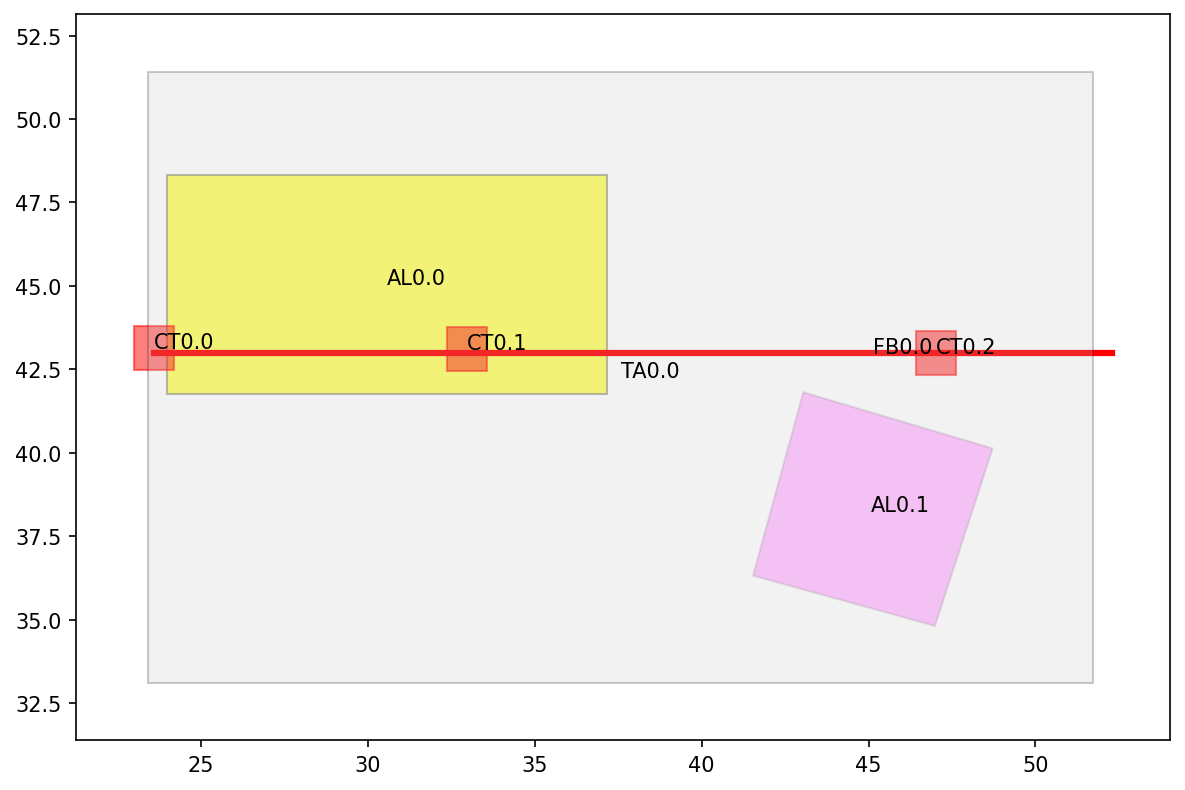
graph.plot_annotations(0)
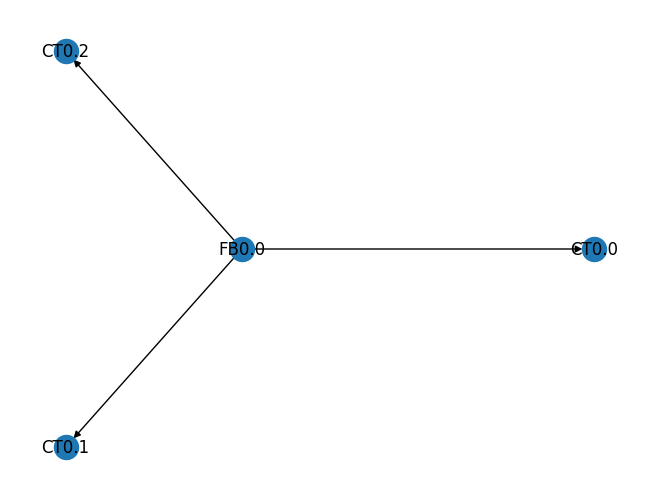
graph.plot_connectivity()
Breaking change!#
LoadedElement.model(precision=3) is now a method instead of an attribute (property). So you have to call .model(), not .model.
The new method allows for a user-defined amount of precision in the numbers. Default is 3 decimal places.
# See how the weirdly shaped loads get turned into distributed loads?
les['FB0.0'].model()
{'element_attributes': {'tag': 'FB0.0',
  'length': 13.788,
  'orientation': 'horizontal',
  'vert_correspondent_below': [],
  'vert_correspondent_above': [],
  'horz_intersects_above': [],
  'horz_intersects_below': ['CT0.0', 'CT0.1', 'CT0.2']},
 'element_geometry': {'geometry': 'LINESTRING (11.319 20.64, 25.107 20.64)',
  'supports': [{'location': 0.29, 'fixity': 'pin'},
   {'location': 4.504, 'fixity': 'roller'},
   {'location': 11.254, 'fixity': 'roller'}]},
 'loads': {'point_loads': [],
  'distributed_loads': [{'transfer_source': '',
    'transfer_reaction_index': '',
    'occupancy': 'f',
    'load_components': [],
    'applied_area': 20.036,
    'start_loc': 0.191,
    'start_magnitude': 0.158,
    'end_loc': 6.524,
    'end_magnitude': 0.158},
   {'transfer_source': '',
    'transfer_reaction_index': '',
    'occupancy': 'a',
    'load_components': [],
    'applied_area': 1.027,
    'start_loc': 8.62,
    'start_magnitude': 0.0,
    'end_loc': 9.343,
    'end_magnitude': 0.377},
   {'transfer_source': '',
    'transfer_reaction_index': '',
    'occupancy': 'a',
    'load_components': [],
    'applied_area': 5.338,
    'start_loc': 9.343,
    'start_magnitude': 0.377,
    'end_loc': 11.237,
    'end_magnitude': 0.372},
   {'transfer_source': '',
    'transfer_reaction_index': '',
    'occupancy': 'a',
    'load_components': [],
    'applied_area': 1.162,
    'start_loc': 11.237,
    'start_magnitude': 0.372,
    'end_loc': 12.067,
    'end_magnitude': 0.0}]}}
2. Output the model files#
Each LoadedElement is written to a JSON file, which can be read back into a dictionary with the standard library json module.
import pathlib
output_dir = pathlib.Path("model_files") / "json"
output_dir.mkdir(parents=True, exist_ok=True)

for tag, loaded_element in les.items():
    with open(output_dir / f"{tag}.json", "w") as file:
        loaded_element.dump_json(file, precision=4)  # numeric precision of the output